

Advertisement

Advertisement
A used phone may look clean, work normally and still need an expensive battery replacement. Before paying, check how much charge the battery can hold, whether the phone charges properly and whether it becomes unusually hot during use.
This is especially important when buying through online shopping platforms, social media sellers or informal markets. A battery that appears to reach 100% may have lost much of its original capacity, so the percentage shown on the screen is not enough.
Advertisement
Use the checks below before completing the transaction. Ask the seller for enough time to test the phone, and do not share your password, banking details or one-time password while testing it.
Table of Contents
What battery health means
Battery health describes the battery’s ability to store power compared with when it was new. Rechargeable phone batteries naturally lose capacity through use, heat and repeated charging.
For example, a phone that originally held 4,000mAh may no longer hold the same amount after years of use. It can still show 100% after charging, but that 100% may represent much less energy than the original battery could store.
Battery health is different from the current battery level:
- Battery level: how much charge is available right now, such as 35% or 90%.
- Battery health: how much capacity the battery can hold compared with its original condition.
- Battery performance: how quickly the phone loses charge, handles demanding tasks and responds while charging.
Check an iPhone’s battery health
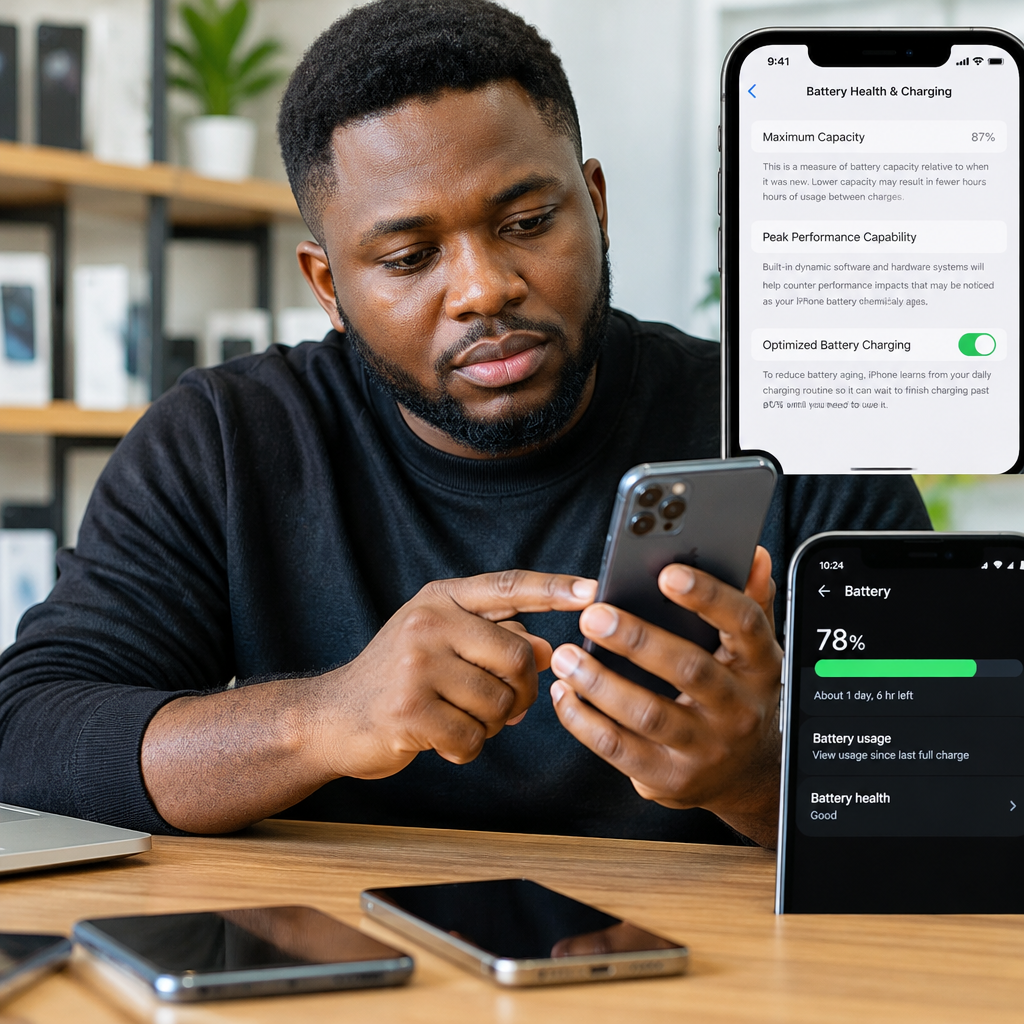
On many iPhones, open Settings, select Battery, then choose Battery Health & Charging. The exact wording may vary slightly between iOS versions.
Look for the maximum capacity percentage and any service or performance message. A high maximum-capacity figure is generally preferable, but it should not be treated as the only test. A phone may report a reasonable figure while having charging-port damage, an unreliable replacement battery or another hardware fault.
How to interpret the iPhone reading
- A capacity close to the original condition usually indicates less battery wear.
- A noticeably reduced capacity means shorter battery life and may justify negotiating a lower price.
- A service warning suggests that the battery may need replacement or professional inspection.
- Unexpected shutdowns, rapid percentage drops or severe heating matter even if the displayed health figure looks acceptable.
Ask whether the battery has ever been replaced. If it has, ask whether the replacement was genuine or from an unknown supplier. Do not accept a seller’s claim as proof; test the phone yourself and inspect any available parts or service information.
Check an Android phone’s battery condition
Android phones do not all use the same battery-health menu. The available information depends on the manufacturer, model and software version.
Start by opening Settings and searching for terms such as Battery health, Battery information, Device care or Diagnostics. Some phones provide a battery condition or diagnostic result, while others only show battery usage and charging settings.
If there is no built-in health figure, use practical testing instead of assuming the battery is good. You can also use a reputable diagnostic application, but treat third-party results as supporting information rather than absolute proof. Avoid installing an app that requests unnecessary access to messages, contacts, banking information or accessibility controls.
On some Android devices, a service or diagnostic menu may be available through the manufacturer’s support application. Menus differ widely, so do not rely on a code found online unless you understand what it does and can exit safely. A seller should not pressure you to run unknown commands or install suspicious software.
Perform a real-world battery test
Battery-health menus are useful, but a short practical test can reveal problems that a percentage hides. Try to test the phone for at least 15 to 30 minutes if the seller agrees.
- Record the starting level. Note the battery percentage and whether the phone is already warm. Do not begin immediately after the seller has used a fast charger, because heat can affect your observations.
- Use the screen continuously. Open a website, browse photos or play a downloaded video. Keep brightness at a moderate level and use the same activity throughout the test.
- Watch the percentage. A small change is not automatically proof of a bad battery, because usage varies by screen brightness, network signal and background activity. A sudden fall or repeated percentage jumps are warning signs.
- Test a demanding function. Use the camera, speaker and mobile network briefly. A weak battery may cause the phone to become unusually hot, slow down or shut off during demanding tasks.
- Check standby behaviour. Lock the phone for several minutes, then check whether the percentage has dropped unusually fast without heavy use.
Do not judge battery life solely by comparing two different phones. A large-screen phone, poor network coverage, high brightness or active mobile data can consume more power even when the battery is healthy.
Test charging before you pay
Connect the phone to a suitable charger and inspect what happens. The charging symbol should appear, and the percentage should begin increasing after a reasonable period.
- Move the cable gently. Charging should not repeatedly stop and restart.
- Check whether the port feels loose or only works at a particular angle.
- Look for excessive heat around the battery, charging port or back of the phone.
- Confirm that the phone does not lose charge while connected under light use.
- If the phone supports wireless charging, test it separately rather than assuming the feature works.
Bring a trusted, compatible charger and cable where possible. A seller’s damaged cable can make a healthy phone appear faulty, while an unsuitable charger can produce misleading results. Never continue testing if the phone smells burnt, swells, leaks or becomes dangerously hot.
Inspect the phone for battery warning signs
Turn the phone off and examine the body under good lighting. A raised screen, bulging back cover, gaps around the frame or unusual separation may indicate a swollen battery. Do not press the phone’s screen or back to force it closed.
Also check for signs that the phone has been opened, such as damaged screws, uneven adhesive or a frame that does not sit properly. Previous repair does not automatically make a phone a bad purchase, but it should be disclosed and reflected in the price. Poor repairs can affect water resistance, charging and battery safety.
Be cautious if the phone gets hot during ordinary tasks, shuts down before reaching a low percentage, restarts unexpectedly or changes from one battery percentage to another unusually quickly.
Use this buying decision framework
| What you find | What it may mean | Practical action |
|---|---|---|
| Good health reading and stable charging | The battery appears to be in reasonable condition | Continue checking the phone’s other features |
| Reduced capacity but no serious symptoms | The phone may work normally but have shorter battery life | Negotiate for the likely replacement cost or choose another phone |
| Fast drain, heat or random shutdowns | The battery or another component may be faulty | Do not pay until inspected, repaired or repriced |
| Swelling or a separated body | Possible battery-safety problem | Do not charge or buy the device |
| Seller refuses basic testing | You cannot verify an important part of the purchase | Walk away, even if the price looks attractive |
Do not forget the other checks
Battery condition is only one part of buying a used phone. Confirm that the seller has removed their account and that the phone can be reset properly. Test the screen, cameras, microphone, speaker, fingerprint reader or Face ID, Wi-Fi, Bluetooth, mobile network, SIM slot and charging port.
Check the device’s storage and model details in Settings, and compare the serial or IMEI information with the phone’s packaging or purchase record where available. Be careful with phones advertised as unusually cheap, especially if the seller wants a deposit before allowing inspection.
Meet in a safe public place, keep your payment private and avoid sending sensitive information to “activate” or “verify” the phone. If buying remotely, request a clear video showing the battery menu, device information and charging test, but remember that a video can be edited or recorded on another device.
Final takeaway
The safest approach is to combine three checks: read the phone’s built-in battery information, observe its performance during real use and test charging with a trusted cable. A battery-health percentage alone cannot prove that a used phone is reliable.
If the device shows swelling, severe heat, unstable charging or unexplained shutdowns, the small saving may not be worth the repair risk. When the seller will not allow basic testing, treat that as useful information and keep looking.
Advertisement
